Photo file size limits for visa and passport applications
Almost every government photo upload enforces a maximum file size. A lot of them also enforce a minimum, which catches people out badly — you compress a rejected photo until it is small enough, and the portal rejects it again for the opposite reason.
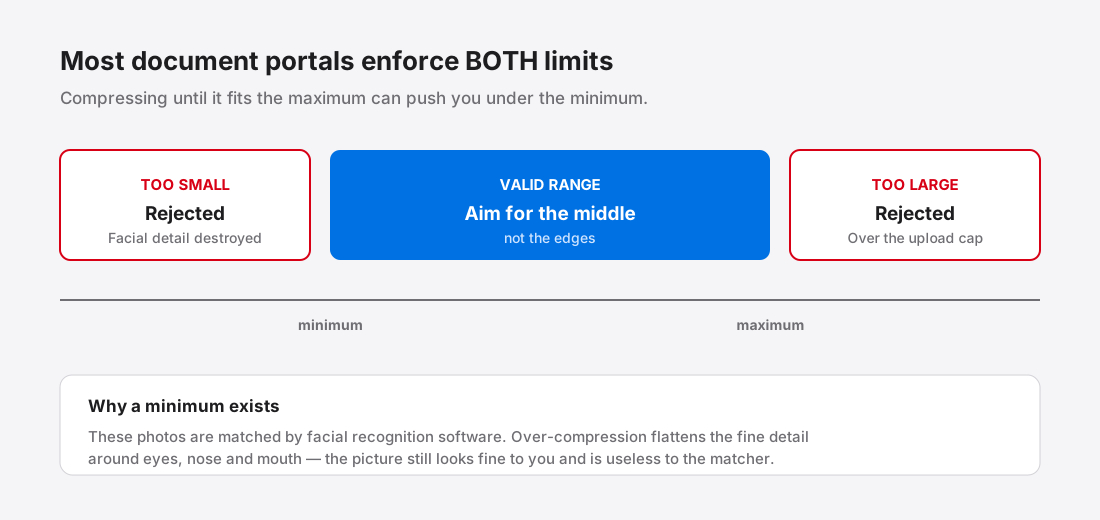
Why there is a floor as well as a ceiling
The maximum is the obvious one, and it exists for ordinary reasons: upload reliability, storage, and discouraging people from submitting an untouched 6 MB camera original.
The minimum is the interesting one. These photos are fed to facial recognition software for biometric matching. Compression works by discarding detail the eye is unlikely to miss — see how image compression actually works — but matching software is not an eye. Push a face through aggressive JPEG compression and the fine gradients around eyes, nose and mouth turn into flat blocks. The picture still looks fine to you and is useless to the matcher.
So a floor of a few dozen kilobytes is a crude proxy for “there is still enough facial detail in here to work with”. It is not arbitrary, and you cannot argue with it.
Check your own portal's numbers, every time
Published requirements vary by country, by document type, and by which portal you are submitting through — and they change. A figure you found on a blog eighteen months ago is not something to stake an application on.
The pattern to expect is a range: a minimum in the tens of kilobytes, a maximum anywhere from a couple of hundred kilobytes to several megabytes, a required format (almost always JPEG), and a pixel dimension range, frequently square.
Get the actual numbers from the portal you are submitting to, on the day you submit. For US applications that is the State Department's own photo requirements page1. Other countries publish theirs on their consular sites. This article deliberately does not reproduce a table of per-country limits, because a stale number here becomes a rejected application for you — and unlike a slow web page, that costs money and weeks.
Hitting a target size without destroying the photo
The instinct is to drag a quality slider down until the file is small enough. That works, badly: quality and file size are related but not proportional, so people overshoot and land far under the minimum, or stop at the first value that fits and ship something far worse than necessary.
The better approach is to search for the highest quality that still fits the budget. That is what a target-size mode does — it encodes repeatedly, narrowing in on the largest file that stays under your limit, so you get the best-looking photo that satisfies the rule rather than the first one that happens to pass.
Two things to do before compressing at all:
- Get the dimensions right first. If the portal wants 600×600 and you have a 4000×3000 photo, resizing does most of the work before compression starts, and it does it without touching image quality at the pixel level. Choosing the right dimensions covers the general principle.
- Crop before you compress, not after. Cropping afterwards changes the file size again and you are back where you started.
The part nobody mentions: this is your face and your passport
A visa photo is biometric data attached to your identity documents. It is worth a moment's thought about where the file goes.
Most online compressors work by uploading your image to a server, processing it there, and sending back a result. For a photo of a sandwich that is unremarkable. For the photo that will sit on your immigration record, you are handing a copy of your face to a company you have not evaluated, under a privacy policy you have not read, for a retention period you do not know.
Your camera roll photo also carries EXIF metadata — commonly including GPS coordinates of where it was taken, which for a passport photo is usually your home or your office2. What EXIF data actually contains goes through what is in there.
Tools that compress inside your browser never transmit the file at all; the difference is structural, not a promise — client-side versus server-side compression explains what actually happens in each case. For document photos specifically, that distinction is the whole ballgame.
A workable order of operations
- Read the current requirements on the portal itself. Write down the format, the pixel range, and both file size limits.
- Crop and resize to the required dimensions.
- Compress to a target comfortably inside the range — if the window is 54–240 KB, aim for the middle, not 239 KB.
- Check the final file size on disk before uploading. Not the estimate the editor showed you.
- Keep the uncompressed original. If the photo is rejected for a reason unrelated to size, you will want to start again from full quality rather than from an already-compressed copy.
That last point matters more than it sounds. Recompressing an already-compressed JPEG stacks the losses — the artefacts from the first pass get treated as real image detail by the second.
References
- Passport Photo RequirementsU.S. Department of State↑
- ExifWikipedia↑