Client-side vs server-side compression
Almost every online image tool uploads your file to a server. A few process it in the browser instead. The difference is invisible in the result and significant in everything else.
How each one works
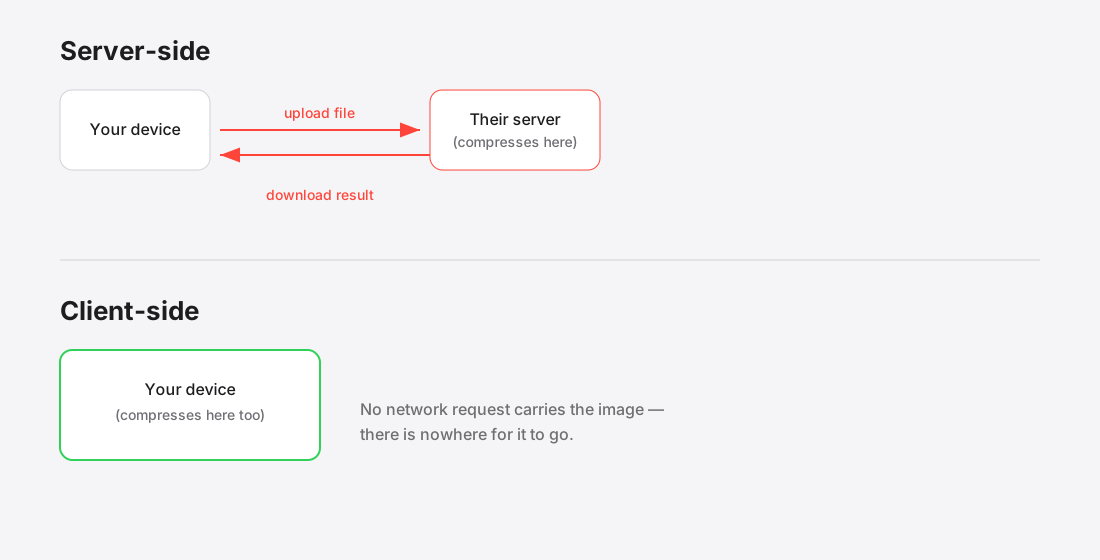
Server-side is the conventional model. Your file is transmitted to a server, processed there with whatever tooling the operator runs, held for some period, and sent back. This is how most well-known compressors work.
Client-side processes the image inside the page using APIs already built into your browser — the Canvas API1 and, off the main thread, OffscreenCanvas2. The file is read into memory on your own device, worked on there, and handed back as a download. No network request carries the image, because there is nowhere for it to go.
What server-side is genuinely better at
Being fair about this matters, because client-side is not universally superior.
- Heavy codecs. A server can run mozjpeg, pngquant or a slow AVIF encoder with settings that would be impractical in a browser tab.
- Very large files. Browsers are limited by device memory. A server is not.
- Automation. An API you can call from a build pipeline is a genuinely different product.
- Weak devices. Processing on a server means the work does not happen on a five-year-old phone.
What client-side is better at
- Privacy. The file never leaves the device, so there is no third-party processor, no retention policy to trust and no breach that can expose it.
- Speed on small batches. No upload and no download means no waiting on the network at all.
- Cost. No servers means no per-image economics, which is why client-side tools tend not to meter usage.
- Working offline. Once the page has loaded, it keeps working without a connection. Nothing server-based can do this.
When the difference actually matters
For a holiday snap, it does not. For a good deal of professional work, it does.
If you handle client material under an NDA, patient images, identity documents, personnel files, legal evidence or unreleased product photography, uploading to a third party is often the thing you are specifically not allowed to do. The tool being free and convenient does not change the obligation.< Under GDPR, an image tied to an identifiable person is personal data3.
The useful question is not "is this tool trustworthy" but "does this tool need to be trusted at all". Client-side processing removes the question rather than answering it.
How to tell which you are using
Open your browser's developer tools, switch to the Network tab, and compress something. If your file appears in an outgoing request, it was uploaded. If it does not, it was not.
A stronger test: load the page, disconnect from the internet entirely, then compress an image. A client-side tool keeps working. A server-based one cannot.
What each model can and cannot promise
The distinction people miss is between a policy and a property.
A server-side tool with an excellent privacy policy is making a promise: we will not retain your file, we will delete it promptly, we will not train on it. That promise may well be kept. It is still a promise, dependent on the company's practices, its retention schedule, its subprocessors, its breach history, and its continued existence under the same ownership.
A client-side tool is making a structural claim: the file was never transmitted. That is verifiable — open the browser's network panel and watch, or disconnect from the network entirely and confirm the tool still works.
This is not an argument that server-side tools are untrustworthy. It is that the two are different categories of assurance, and for genuinely sensitive files the difference matters.
Where client-side genuinely loses
An honest account has to include the trade-offs, because they are real:
- Format support is the browser's. A browser tool can only decode what the browser decodes — which is why HEIC works in Safari and fails elsewhere. HEIC explained covers that specific wall.
- Encoders are the browser's too. A dedicated server can run tuned encoders at settings a browser's built-in encoder does not expose.
- Very large files hit device memory. Decompressed pixel data is far larger than the file, and a phone has limits a server does not.
- No server-side automation. Client-side needs a browser, so it does not fit a build pipeline or a CMS hook.
For most web images none of these bind. For a 200 MP scan or an automated pipeline, they do.
Choosing per file, not once
This does not have to be a permanent allegiance. Decide by what the file is.
Use client-side when the content is sensitive or identifying — document and visa photos, medical images, anything under NDA, client work before publication, or personal photos carrying location metadata.
Server-side or a build-step tool is perfectly reasonable for stock photography, marketing images already destined for public release, and any high-volume automated pipeline where a human is not in the loop anyway.
References
- Canvas APIMDN Web Docs↑
- OffscreenCanvasMDN Web Docs↑
- What is personal data?GDPR.eu↑