Stop images causing layout shift
You have experienced this from the other side: you go to tap a link, an image finishes loading above it, and the whole page lurches. That is Cumulative Layout Shift, it is measurable, and images cause most of it.
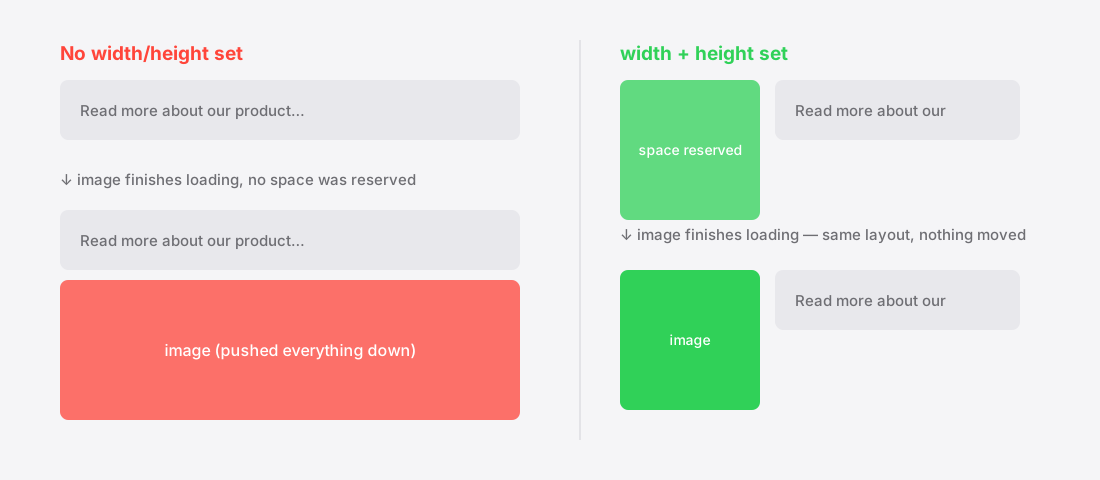
What CLS measures
Cumulative Layout Shift scores how much visible content moves around unexpectedly while a page loads1. It is one of the three Core Web Vitals2, and unlike a speed metric it is about stability rather than duration.
Google considers a CLS below 0.1 good1. The score is not a count of shifts — it weights how much of the screen moved and how far, so one large late-arriving image can be worse than several small ones.
Why images are the usual culprit
When the browser parses <img src="hero.jpg"> with no dimensions, it has no idea how tall that image will be. It cannot reserve space for something whose size it will not learn until the bytes arrive.
So it lays the page out as though the image were zero height, renders the text, then — when the image arrives — shoves everything down to make room. Every image without dimensions is a scheduled layout shift.
The fix, which is genuinely two attributes
Put width and height on the element, matching the intrinsic pixel dimensions of the file3:
<img src="hero.webp" width="1600" height="900" alt="…">
Modern browsers use those two numbers to compute an aspect ratio and reserve a correctly-shaped box before the file downloads4. Your CSS can still do width:100%; height:auto — the attributes provide the ratio, the CSS provides the display size. They do not fight.
This is the whole fix for the overwhelming majority of image-caused CLS.
The cases that still bite
- Responsive images with different ratios. If your
srcsetsources are not all the same aspect ratio, the reserved box will be wrong for some of them. Keep ratios consistent — see the srcset guide. - Ads and embeds. Third-party iframes that size themselves after load are a common CLS source. Reserve space with a min-height container.
- Web fonts. Not an image problem, but it shows up in the same score when text reflows as a font swaps in.
- Images injected by JavaScript. Anything added to the DOM after first paint shifts whatever is below it unless space was reserved.
How to actually check
CLS is measured on real visitors through the Chrome UX Report, not in a lab5, so your own fast machine is not the arbiter. Lighthouse gives you a lab number that is useful for catching regressions, but the field data is what counts for search.
The practical loop: add dimensions everywhere, confirm the lab score drops, then wait for field data to catch up over the following weeks.
Why width and height still matter in responsive layouts
A persistent misconception is that width and height attributes are obsolete once CSS controls sizing. The opposite is true, and the behaviour changed in browsers' favour.
Modern browsers compute an aspect ratio from the two attributes and use it to reserve correctly-proportioned space before the file arrives — even when CSS then scales the image to width: 100%. The attributes are not fighting your CSS; they are giving the layout engine a ratio it otherwise has no way to know.
The pairing that makes this work is width and height in the HTML plus height: auto in the CSS. Without the CSS rule the image can render at its literal attribute height and distort.
The shifts that are not images
Once images are fixed, the remaining shifts usually come from a short list, and it is worth knowing them so the metric does not stall:
- Web fonts. A fallback font swapped for a custom one at different metrics reflows every line of text.
font-display: swapplus a metrics-matched fallback minimises the jump. - Ads and embeds. Injected iframes with no reserved container are a leading cause. Give every ad slot a fixed min-height matching its most common size.
- Cookie banners and notification bars inserted at the top of the document after render, pushing everything down.
- Content loaded after paint — related posts, comment counts, review stars — appearing above existing content.
The general rule is identical to the image case: if something will arrive later, reserve its space now.
References
- Cumulative Layout Shift (CLS)web.dev↑
- Web Vitalsweb.dev↑
- The Image Embed element (<img>)MDN Web Docs↑
- aspect-ratioMDN Web Docs↑
- Chrome UX ReportChrome for Developers↑