A batch image workflow that holds up
Processing four images is not a workflow. Processing four hundred, repeatedly, for different destinations, without losing track of which version is which — that needs a system.
Decide the destination before you touch anything
The most common waste is processing a batch, then discovering it was the wrong size for where it was going. Images remain the largest share of page weight12, so getting a batch right is worth the two minutes of setup.
Every batch has a destination, and the destination determines everything: dimensions, format, quality and file size ceiling. Write it down before you start.
- Website — 1920px, WebP, quality 75
- Client delivery — full resolution, JPEG, quality 90
- Email — 1920px, JPEG, 200 KB ceiling
- Social — platform dimensions, JPEG, quality 85
Never process your originals
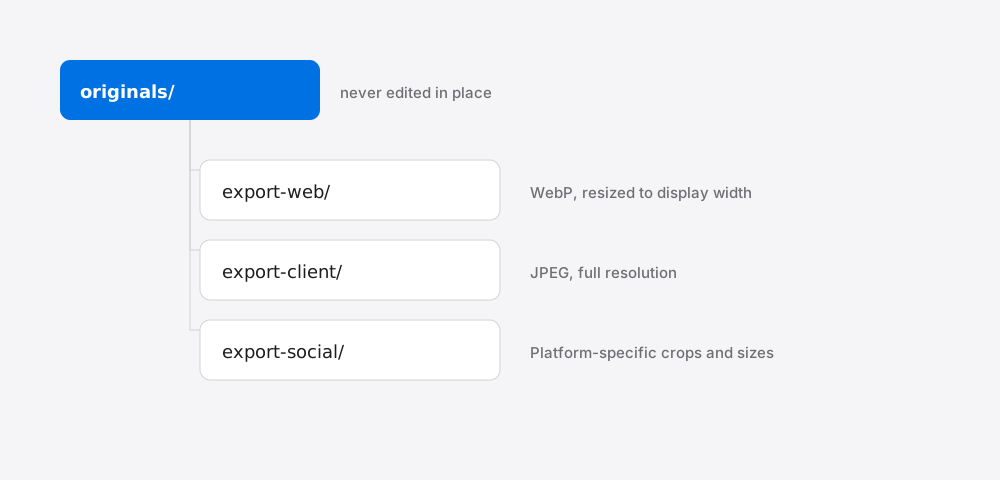
Keep originals in one directory and never touch them. Every export goes to a new directory named for its destination.
This sounds obvious and is broken constantly, usually by a tool that overwrites in place. The cost of getting it wrong is unrecoverable — you cannot restore detail that was compressed away.
A structure that works: originals/, export-web/, export-client/, export-social/. Flat, obvious, and impossible to confuse six months later.
Resize before compressing, always
The order matters more than most settings.
Resizing to displayed dimensions removes far more data than compression does, and it costs almost no visible quality. Compressing first and resizing after means you compressed pixels you then discarded, and the double pass degrades the result.
Resize, then compress, then stop. One pass each.
Use a size ceiling rather than a quality guess
For anything with a hard limit — email, upload forms, a performance budget — target the file size directly rather than guessing at quality and checking afterwards.
The difference matters across a batch. A fixed quality setting produces wildly varying file sizes depending on image content: a plain portrait might land at 80 KB and a detailed landscape at 900 KB from the same setting. A size ceiling gives you predictable output, which is what a batch needs.
Keep the last step boring
Batch work goes wrong at the end, when attention drops. A few habits that prevent most of it:
- Spot-check three files — first, middle, last. Not all of them, but never zero.
- Check the largest output, which is where quality problems show first.
- Confirm the count matches what went in.
- Strip metadata for anything leaving your control.
Two minutes at the end saves resending the batch.
A directory layout that makes mistakes hard
Most batch disasters are one command run in the wrong directory. Structure defends against that better than discipline does:
originals/ — untouched, read-only if your system allows it, backed up.working/ — resized intermediates, disposable.output/ — final compressed files, regenerable from originals at any time.
The rule that follows: nothing ever writes into originals/. If output is wrong, delete output/ and rerun. Because everything downstream is reproducible, a mistake costs minutes rather than being permanent.
Making the originals directory genuinely read-only at the filesystem level is worth the small inconvenience. It converts a catastrophic error into a permission denied message.
Resize first — the order is not arbitrary
Resize, then compress. Reversing it wastes work and quality: compressing at full resolution spends effort encoding pixels you are about to discard, and the resize afterwards means a second encode, stacking generation loss.
Resizing first also makes the compression stage easier, since there is less data to describe. The saving is quadratic — halving width quarters pixel count — so this is where most of the reduction comes from, before the quality slider is touched at all. Working out the target width covers picking the number.
Spot-check the output before trusting the batch
The risk of batch processing is uniformity: one bad setting applied identically to two thousand files, discovered a month later.
Before committing, run the settings over a deliberately awkward handful — the smoothest image in the set (gradients show blocking first), the busiest, one with text in it, and one with transparency. If those four survive, the settings are sound.
Then sanity-check the outputs in bulk: sort by file size and look at both ends. Anything unexpectedly large is usually the wrong format for its content; anything unexpectedly tiny is usually over-compressed or broken. Both show up immediately in a size-sorted listing and are invisible in a thumbnail grid.
References
- Web Almanac: MediaHTTP Archive↑
- Page Weight reportHTTP Archive↑