Lazy loading images without breaking LCP
Browser-level lazy loading is genuinely free performance for images below the fold, and a genuine own-goal when applied above it. The difference is one attribute on one element.
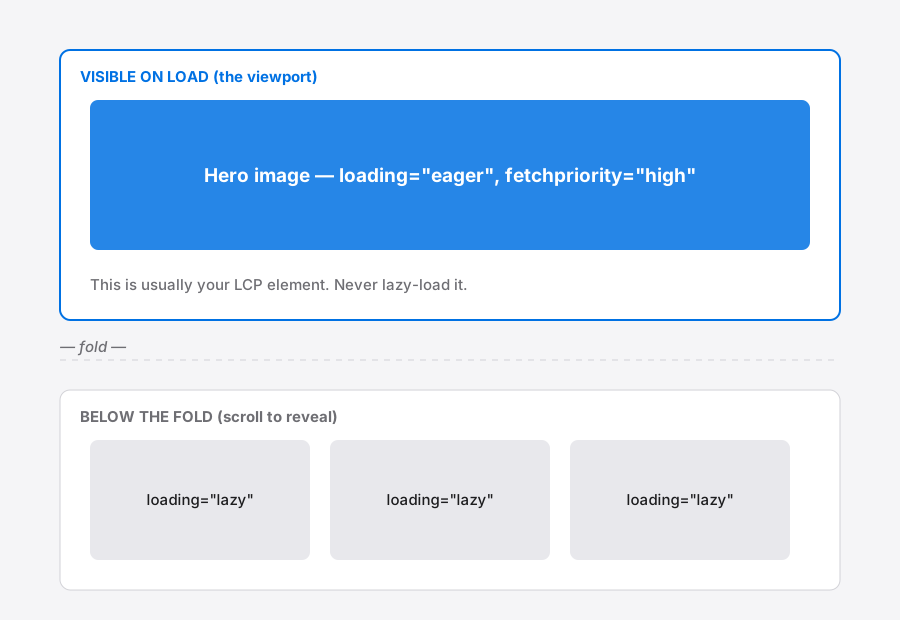
What loading="lazy" actually does
Adding loading="lazy" to an <img> tells the browser to defer fetching that image until it is close to the viewport1. No library, no intersection observer, no JavaScript at all. It is supported across all current browsers2.
The browser decides "close to the viewport" for you, and the distance it uses varies with connection speed — slower connections start loading earlier, so the image is more likely to have arrived by the time you scroll to it3.
For a long article or a product grid, this can remove the majority of image bytes from the initial page load without changing a single pixel of what the visitor sees.
The mistake that costs you the metric
Your Largest Contentful Paint element is usually an image — a hero, a banner, the first product shot4. Lazy-loading it means the browser deliberately delays the exact request the metric is timing.
The effect is not subtle. Deferring the LCP image adds the lazy-load discovery delay directly onto the metric, and Google's threshold for a good LCP is 2.5 seconds4.
The rule is simple: everything below the fold gets loading="lazy"; the LCP image never does. If you are unsure which image is your LCP element, measure it rather than guess — the LCP guide covers how.
Give the important image a head start instead
For the hero, do the opposite of lazy loading. fetchpriority="high" tells the browser this image matters more than the others competing for bandwidth1.
Combined with a correctly sized source file, that is most of the LCP battle. A hero that is both high-priority and 120 KB will beat a hero that is high-priority and 4 MB every time — priority changes the order of requests, not the size of them.
Reserve the space, always
Lazy loading and layout shift interact badly if you skip dimensions. An image that loads late, with no reserved space, pushes content down the moment it arrives — that is Cumulative Layout Shift5.
Set width and height attributes on every image, lazy or not. Browsers use the ratio to reserve the right box before the file arrives, and CSS can still size it responsively. Details in the layout shift guide.
A checklist you can apply in ten minutes
- Find your LCP image. Remove
loading="lazy"from it if present. - Add
fetchpriority="high"to that one image only. - Add
loading="lazy"to every image below the fold. - Add
widthandheightto all of them. - Compress the hero properly — priority does not shrink a file.
How the browser decides when to load
Lazy loading is not “load when it enters the viewport”, which is why images sometimes appear already loaded when you scroll to them, and sometimes visibly pop in.
Browsers begin fetching before the image is visible, using a margin below the fold so that normal scrolling finds the image already there. That margin is not fixed — implementations vary it by connection speed, loading more eagerly on fast connections and more conservatively on slow ones.
The practical consequence: you cannot rely on precise behaviour, and testing on a fast desktop connection will not show what a phone on a poor connection experiences. Throttle the connection in DevTools when checking.
Reserve the space or you trade one metric for another
Lazy loading and layout shift are directly connected, and fixing the first while ignoring the second makes the page worse overall.
A lazy image with no dimensions occupies zero height until it arrives, then suddenly claims its full height and shoves everything below it down — usually while someone is reading. That is Cumulative Layout Shift, and it is its own ranking signal.
Set width and height on every image, lazy or not. Modern browsers use the ratio to reserve correctly-proportioned space even in responsive layouts. Fixing image-caused layout shift covers the detail — the two techniques belong together, not in sequence.
Common questions
Should I lazy-load everything below the fold? Broadly yes, with one caveat: on a short page where everything is close to the viewport, lazy loading adds coordination overhead for very little saving. The benefit scales with how much content sits below the fold.
Does lazy loading help Largest Contentful Paint? Only indirectly, by leaving more bandwidth for the LCP element. Applied to the LCP element it makes the metric distinctly worse — see fixing LCP.
Do I still need a JavaScript library for this? No. The native loading="lazy" attribute is supported across current browsers, and a script-based implementation now mostly adds weight and a failure mode when the script does not run.
What about background images in CSS? The attribute only applies to <img> and <iframe>. CSS backgrounds are fetched when the element matches a rule, which browsers already defer for off-screen elements — though far less predictably. Content images should be <img> elements anyway, for accessibility as much as loading.
References
- The Image Embed element (<img>)MDN Web Docs↑
- Lazy loading via attribute — browser supportCan I use↑
- Browser-level image lazy loading for the webweb.dev↑
- Largest Contentful Paint (LCP)web.dev↑
- Cumulative Layout Shift (CLS)web.dev↑