How to fix Largest Contentful Paint
Of the three Core Web Vitals, LCP is the one most sites fail — and on the majority of pages, the element being measured is an image. That makes it unusually fixable.
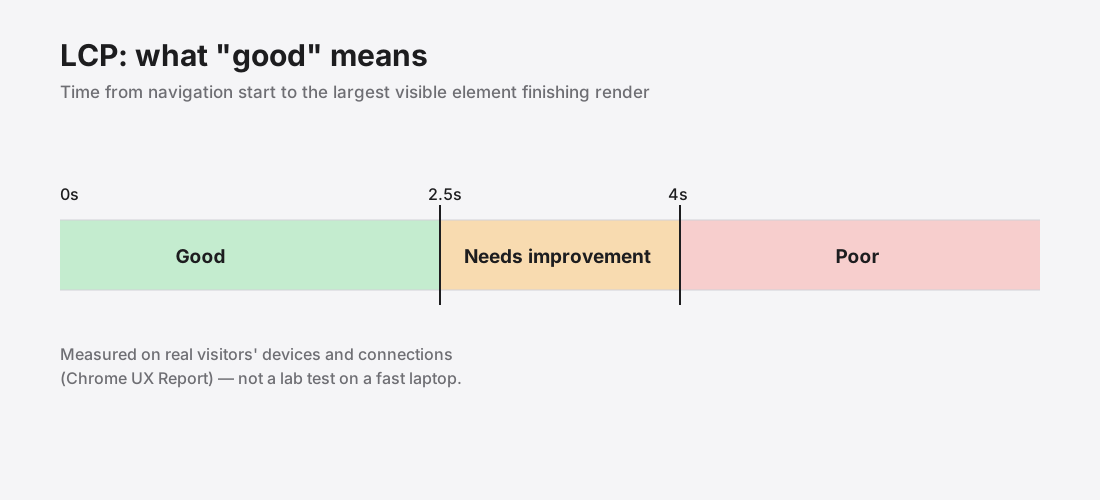
What LCP actually measures
Largest Contentful Paint1 is the time from navigation start until the largest visible element has finished rendering. Not when the page starts appearing, and not when everything has loaded — specifically when the biggest thing in the viewport is done.
Google's thresholds: good under 2.5 seconds, needs improvement up to 4 seconds, poor beyond that. The number that counts is the 75th percentile of real visitors, so a quarter of your traffic can be slower than your target and you still pass.
It is measured on real devices on real connections through the Chrome UX Report2, which is why lab results on a fast laptop are so often misleading. It is one of the three Core Web Vitals3.
Find the element first
Do not optimise blindly. Open Chrome DevTools, run a Lighthouse report, and look at the LCP entry — it names the exact element.< Google documents the full remedy list4.
Nine times out of ten it is a hero image, a product photograph, or an article header. Occasionally it is a large block of text, which changes the fix entirely: text LCP is usually about font loading, not images.
Also check Search Console's Core Web Vitals report, which uses real visitor data rather than a lab run. The two often disagree, and the field data is the one that affects ranking.
The fixes, in order
1. Make the image smaller. Resize to displayed dimensions, convert to WebP, compress to quality 75. This is usually enough on its own and typically cuts the file by 90%.
2. Never lazy-load it. loading="lazy" on your LCP image delays the exact thing being measured. Use fetchpriority="high" on it instead.
3. Preload it. A <link rel="preload" as="image"> in the head starts the download before the parser reaches the tag.
4. Remove what blocks rendering. The image cannot paint until CSS has parsed. Render-blocking stylesheets and synchronous scripts in the head delay everything behind them.
Things that look like fixes but are not
- A CDN alone. It reduces latency, not bytes. A 4 MB image is still 4 MB, delivered slightly closer.
- A placeholder or skeleton. It makes the wait feel shorter but does not change when the real element renders. LCP is unmoved.
- Lazy-loading everything. Helps the rest of the page, hurts LCP if applied to the hero.
- A caching plugin. Helps repeat visitors. LCP is measured largely on first views.
A realistic target
A hero image at 1920px, WebP, quality 75, is roughly 150–250 KB. On a normal mobile connection that arrives comfortably inside the 2.5 second budget, leaving room for everything else the page has to do.
Get the image right and LCP usually takes care of itself.
Finding the element instead of guessing
Optimising the wrong element is the most common way this work gets wasted, and it is entirely avoidable — the browser will tell you which element it measured.
In Chrome DevTools, the Performance panel marks the LCP element directly on the timeline. Lighthouse names it in the diagnostics. There is also a small script you can run using PerformanceObserver on the largest-contentful-paint entry type, which reports the element on real page loads rather than in a lab.
Check it on mobile as well as desktop. The LCP element frequently differs between the two, because a different amount of content fits above the fold — a hero image on desktop can become a heading on mobile, which changes the fix completely.
When the LCP element is text, not an image
If the largest element is a block of text, none of the image advice applies and the problem is almost always fonts.
A custom web font that has not loaded leaves the browser either showing nothing (invisible text) or a fallback that gets swapped later. Either way the text paint is delayed or shifted.
The fixes are different: set font-display: swap so text renders immediately in a fallback, preload the one font file used above the fold, and subset the font so it carries only the characters you need. Self-hosting fonts rather than fetching them from a third-party origin removes an extra connection from the critical path.
Things that measurably do not help
Worth stating plainly, because each of these gets recommended constantly:
- A CDN alone. It cuts latency, not bytes. A 4 MB image is still 4 MB, arriving from closer.
- Caching plugins. They help repeat visitors. LCP is dominated by first views.
- Preloading everything. Preload is a priority instruction. Applied to several resources it prioritises nothing and competes with the element you actually care about.
- Skeleton screens. They change how the wait feels, not when the real element paints. LCP is unmoved.
The boring answer remains the effective one: make the LCP image smaller, in bytes and in pixels, and get out of its way. Right-sizing it usually does more than everything else combined.
References
- Largest Contentful Paint (LCP)web.dev↑
- Chrome UX ReportChrome for Developers↑
- Web Vitalsweb.dev↑
- Optimize Largest Contentful Paintweb.dev↑