Image formats explained
Six formats, each with one job it does better than the others. Once you know which is which, the choice stops being a decision.
JPG — photographs, and nothing else
JPEG is a lossy format built for continuous-tone images, which is a precise way of saying photographs1. It handles soft gradients, skin tones and natural texture extremely well.
It cannot store transparency, and it blurs hard edges and text badly. A screenshot saved as JPEG looks visibly worse than the same screenshot as PNG, at a similar file size.
Use it for: photographs, especially anything leaving your site. Avoid for: logos, screenshots, text, anything needing transparency.
PNG — graphics, transparency, precision
PNG is lossless with full alpha transparency2. Every pixel survives exactly, which is what you want for a logo that must sit cleanly over any background.
The cost is size. A photograph saved as PNG is routinely five to ten times larger than a good JPEG of the same image with no visible benefit, because it is faithfully storing sensor noise nobody can perceive.
Use it for: logos, icons, screenshots, diagrams, anything with transparency or sharp edges. Avoid for: photographs.
WebP — the sensible modern default
WebP does both lossy and lossless, supports transparency, and supports animation. It is 25–35% smaller than JPEG for photographs and often 50% smaller than PNG for graphics.
It is, in short, better than both at almost everything, and supported everywhere that matters.
Use it for: essentially everything on your own website. Avoid for: files leaving your site to a destination you cannot verify.
AVIF, GIF and SVG
AVIF compresses better than WebP again — roughly half the size of JPEG. It is slower to encode and slower to decode, and support, while broad, is not universal. Worth it for large hero images; rarely worth it for thumbnails.
GIF is obsolete for almost every purpose. It is limited to 256 colours and produces enormous files. Animated GIFs should be short videos (MP4 or WebM), which are dramatically smaller and look better. The only real reason to use GIF is a platform that accepts nothing else.
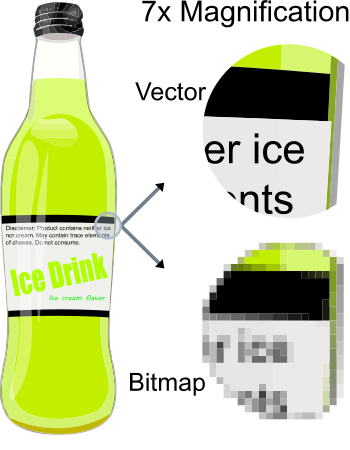
SVG is not a pixel format at all — it is a set of drawing instructions3. It scales to any size with no quality loss and is usually tiny. For logos, icons and simple illustrations it beats every other option outright. It cannot represent a photograph — when vector wins goes deeper.
The decision, compressed
- Is it a logo or icon made of shapes? → SVG
- Does it need transparency or contain text? → WebP, or PNG if the destination demands it
- Is it a photograph for your own site? → WebP
- Is it a photograph going elsewhere? → JPG
- Is it animated? → MP4 or WebM, not GIF
A decision procedure, in order
Rather than memorising format properties, work through the questions in sequence — the first one that matches decides it:
- Is it a logo, icon, chart or diagram you have vector artwork for? Use SVG. Resolution-independent, usually tiny, sharp at any size. See SVG versus raster.
- Does it contain readable text or hard-edged UI? Use a lossless format. Lossy compression is specifically bad at edges, and text is nothing but edges.
- Is it a photograph? Use a lossy format — WebP for the web, JPEG where maximum compatibility matters.
- Does it need transparency? Lossy WebP if it is photographic; PNG if it is flat graphics and SVG is not available.
- Is it animated? Use video, not GIF. An MP4 or WebM is routinely a tenth the size.
Format is not the same question as compression
These get conflated constantly, and separating them makes the choices much clearer.
Format is the container and the coding scheme — what a decoder needs to understand to read the file. Compression method is whether data is discarded. Modern formats decoupled these: WebP and AVIF each do lossy and lossless, with or without transparency.
The old mental shortcut — “PNG means transparency, JPEG means photos” — encodes a limitation that no longer exists. A logo with an alpha channel does not have to be a large PNG; lossy WebP handles it at a fraction of the size. Lossy versus lossless covers what that actually trades away.
The two mistakes that account for most wasted bytes
Photographs saved as PNG. By a distance the most expensive default on the web. PNG preserves every pixel faithfully, including sensor noise, and a photo can easily be ten times larger than a visually identical JPEG or WebP. Why PNG files get so large covers the diagnosis.
Animated GIFs. GIF is limited to 256 colours and compresses animation badly. A short looping clip as MP4 or WebM is dramatically smaller and looks better. There is essentially no case left where an animated GIF is the right technical answer.
Neither is subtle. Both are usually the result of an export default nobody revisited, which makes them among the cheapest wins available.