WebP vs AVIF vs JPEG
Three formats, three sets of trade-offs, and a great deal of confident advice online that has not been updated since 2021. Here is where things actually stand.
The short version
Use WebP for almost everything on the web. It is meaningfully smaller than JPEG1, universally supported2, and fast to encode.
Use AVIF3 when file size genuinely matters more than anything else and you can test the result. It is smaller again, but slower on both ends, and support is newer4.
Use JPEG5 for anything leaving your website — email, client deliverables, print, uploads to platforms you cannot verify. For platform-specific sizes see the social media guide.
If you stop reading here you will make the right call most of the time.
What the numbers look like
On a typical photograph at matched visual quality, expect roughly6:
- JPEG — the baseline. Everything else is measured against it.
- WebP — 25–35% smaller.
- AVIF — 20% smaller again than WebP, so roughly half of JPEG.
These are averages and your images will vary. Flat graphics favour WebP more heavily; noisy, detailed photographs narrow the gap. The only number that matters is the one you get on your own images, which is why it is worth converting a handful and comparing before committing a whole library.
Browser support, honestly
WebP is a solved problem. Chrome, Firefox, Edge, Safari and Opera all support it, desktop and mobile. Safari was the last significant gap and closed it in 2020. Unless you are supporting browsers older than that, you can serve WebP directly with no fallback.
AVIF is broadly supported but not universally. Support is good in current Chrome, Firefox and Safari, but the tail is longer, and some older devices and embedded browsers still miss it. If you use AVIF, use a <picture> element with a WebP or JPEG fallback rather than serving it bare.
The catch with AVIF
AVIF's compression is genuinely better. The cost is time, at both ends.
Encoding is significantly slower than WebP — noticeable if you are processing a batch. More importantly, decoding is slower too, and that happens on your visitor's device. On a low-end phone, a large AVIF can take long enough to decode that you lose some of the benefit you gained on transfer.
This is why AVIF is not simply the correct answer. For a small image, the saving is small in absolute terms and the decode cost is real. For a large hero image on a fast device, AVIF wins clearly.
A rule that holds up
Default to WebP at quality 75. Convert your heaviest handful of images to AVIF as well and compare — if the saving on those specific files is large, serve them with a <picture> element. Keep JPEG originals for anything that leaves the site.
That gets you most of the available benefit without turning your asset pipeline into a research project.
Encoding cost is a real constraint
The comparison is usually framed purely on output size, which quietly ignores what the encode costs you. AVIF is dramatically slower to encode than JPEG or WebP — often by an order of magnitude at comparable effort settings.
For a personal blog publishing a few images a week, this is irrelevant. For a site processing thousands of user uploads, or generating derivatives on demand at request time, it is the difference between a workable pipeline and a queue. Decode speed is much closer between the formats, so the cost falls on whoever encodes, not on the visitor.
This is why a lot of production setups land on WebP as the default and reserve AVIF for a small number of high-value images — hero shots, product photography — where the extra saving justifies the extra time.
Serving more than one format safely
You do not have to choose globally. The <picture> element lets the browser pick the first format it can decode:
<picture><source srcset="photo.avif" type="image/avif"><source srcset="photo.webp" type="image/webp"><img src="photo.jpg" alt="..."></picture>
Order matters: browsers take the first <source> whose type they support, so the most efficient format goes first and the <img> at the end is the universal fallback. That fallback is not optional — it is also what older crawlers and email clients see.
The cost is storing and generating three files per image. Worth it for a handful of important images; usually not worth it site-wide. If you combine this with multiple widths via srcset, the number of derivatives multiplies quickly — the responsive images guide covers keeping that manageable.
The formats this comparison leaves out
Two others come up and are worth placing:
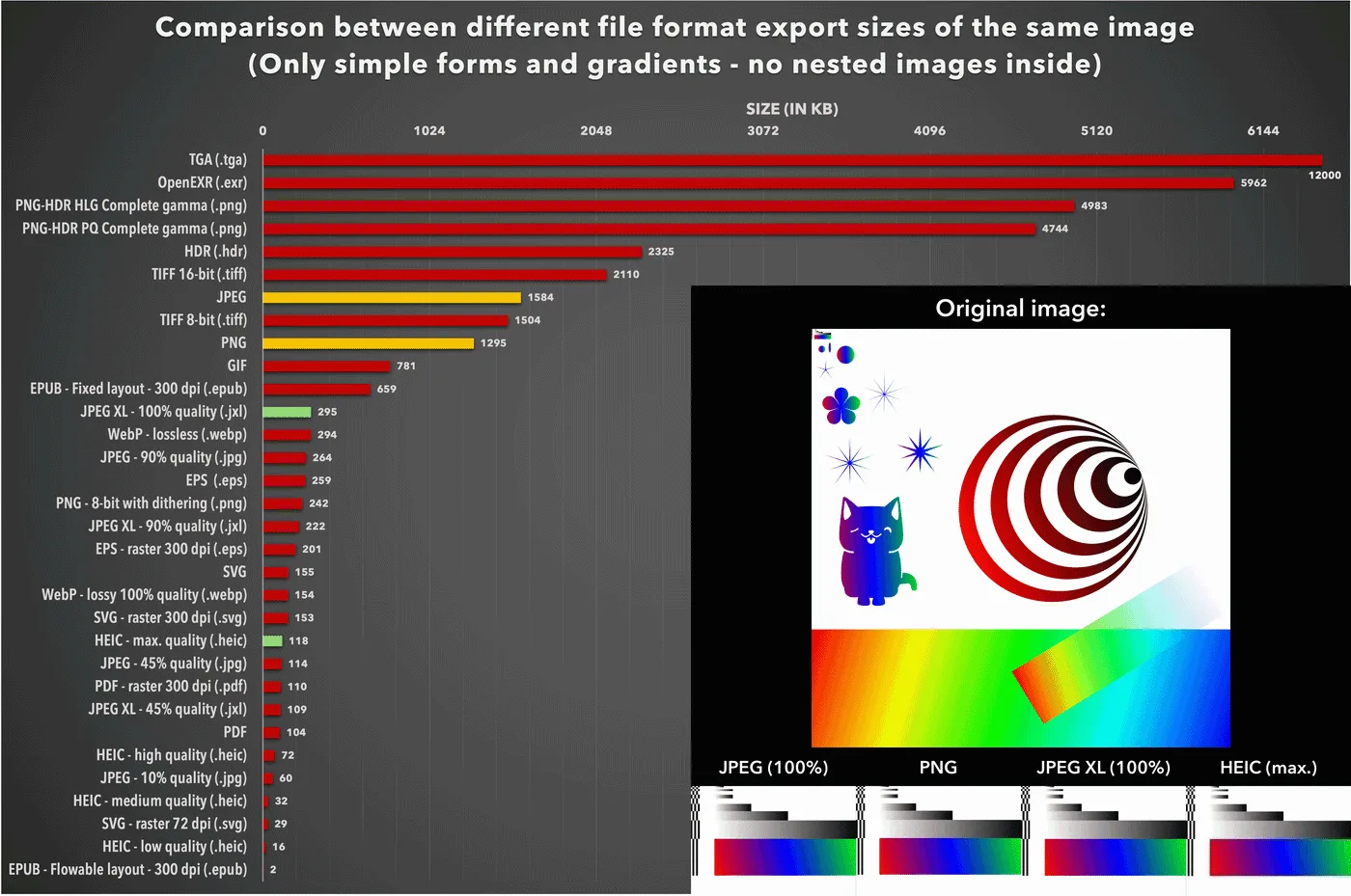
PNG is not a competitor here, because it answers a different question. It is lossless, which makes it right for flat graphics and wrong for photographs — why PNG files get so large covers that failure mode, which is by far the most common format mistake on the web.
HEIC compresses comparably to AVIF and is what your phone is probably shooting right now, but browser support outside Safari never materialised, so it is not a web delivery format. It is a source format you convert away from — see HEIC explained.
And JPEG XL remains genuinely promising and genuinely not deployable, having been added to and then removed from Chrome. Worth watching; not worth planning around today.
References
- WebP Compression StudyGoogle Developers↑
- WebP image format — browser supportCan I use↑
- AV1 Image File Format (AVIF)Alliance for Open Media↑
- AVIF image format — browser supportCan I use↑
- JPEG — Joint Photographic Experts GroupJPEG Committee↑
- Image file type and format guideMDN Web Docs↑